
AI e2e testing with Midscene, Puppeteer, and Zephyr Cloud
 Zack Chapple
Why AI e2e testing
Apart from the fact that it seems there is an AI agent for everything lately, and it is something that I get asked about by every investor and customer. There is an interesting thought that came into my mind as I was preparing the content behind this blog:
What if our acceptance criteria and the natural language of it, was also our end-to-end test?
AI Testing
After the initial release of Midscene I started to follow the project, and even mentioned it during the Acceleration Week covered in our case study with SGWS. However, at that project it was more of a curiosity than something I had the time to dedicate to testing myself.
Getting Started
There were several questions that I had getting started with Midscene.
- How hard would it be to get started?
- How will I begin to automate the testing?
- What other tools will I need to use in combination with Midscene?
First impressions
The first thing I tested was the chrome side panel. It was easy to install the only small friction point was having to set an OpenAI api token which took a few moments to figure out. After setting the token I was able to run my first test.
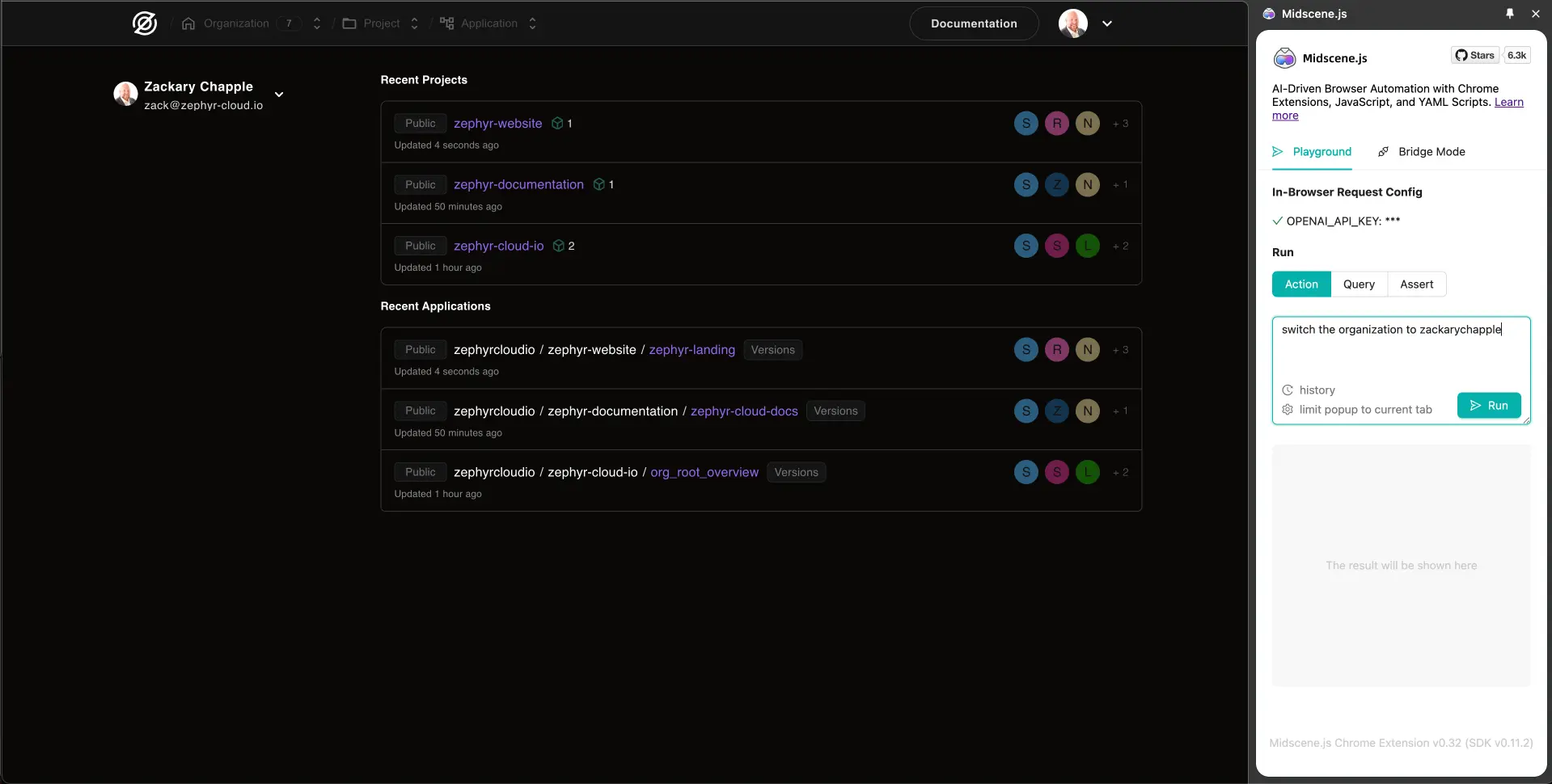
This first test was intentionally obtuse because I wanted to see if the AI would actually be able to do the task. This served as a multi-faceted test for me. First I was testing the capabilities of Midscene itself, second I was testing how intuitive our Zephyr Cloud user experience was.
Given that we had just updated the capabilities for organization switching it was important to me that it was intuitive.
That brought me to another interesting thought:
What if using AI-based and natural language to test our user experience actually helps us fix user experience and journey issues?
Real usage
One of my new favorite ways to get started is to generate a project with Bolt and then download that, connect it to Zephyr and then do what I really want to test.
This is a workflow that I already created a video on and uploaded to YouTube, so I won't reiterate it here.
There is a README in the sample application that you can use to follow along to see the steps, missteps, and the reality of working with something new.
Reality of dogfooding
When we first started creating Zephyr we had a lot of examples of usage, however our own applications and documentation sites were not actually using Zephyr. That has changed and now our marketing site, documentation, and very soon our full platform will be 100% deployed with Zephyr. Part of the dogfooding process though is finding the edges in your documentation and things that are missing.
Setting up GitHub actions to do Zephyr deployments was one of the first things that I found was missing. A new doc was created to address the missing GitHub automation documentation.
Adding Midscene
Adding Midscene itself was relatively easy. I decided to use Midscene together with Puppeteer since it was something that I was familiar with. It was fairly easy to install with a single npm command found in the instructions from their doc site:
npm install @midscene/web puppeteer tsx --save-devAfter installing, I had to make a slight adjustment to the environment variables to pass our OpenAI api token as well as a few additional variables that needed to be used for the Puppeteer configuration.
- name: Run AI E2E tests with Puppeteer and Midscene
  env:
    OPENAI_API_KEY: ${{ secrets.OPENAI_API_KEY }}
    PAGE_URL: ${{ steps.build.outputs.url }}
    REMOTE_URL: ${{ steps.buildRemote.outputs.remoteUrl }}
REMOTE: ${{ steps.buildRemote.outputs.remote }}First test
The first true test was to see if the content from one of the federated remotes was actually on the page. This was actually going to be my "broken" state. The thought process was that since the UI is now composed of versioned federated remotes I can validate that a new version fixes the user experience.
await mid.aiAssert('the text on the screen should contain "This is a button from Vite remote."');
console.log('Production is broken');
Another key thought:
What if our e2e tests could actually validate that something is broken, then switch to the new version to validate that the issue is fixed in a single test suite?
In our documentation we cover how to add overrides for federated remotes from the GitHub action output in our e2e testing guide, so I won't cover that here.
Here is the general testing flow that we do in order to validate that a new remote is fixing an issue.
// Validate that the text is "Broken"
await mid.aiAssert('the text on the screen should not contain "Yep Really, not yet"');

// Set the Zephyr overrides on the session
await page.evaluate(
  (remote, url) => {
    sessionStorage.setItem(remote, url);
  },
  remote,
  remoteUrl,
);

// Reload the page so the overridden remote can be visible.
await page.reload();

// Validate that the text is "Fixed"
await mid.aiAssert('the text on the screen should contain "This is a button from Vite remote. Yep Really, not yet"');General thoughts
I believe that there is a lot of opportunity in the AI testing space. Deciding which AI model to use and how obtuse to make the prompt text are business decisions that we have yet to make.
There is an interesting thought that we could use Gherkin as our acceptance criteria and our e2e test prompts.
Final big thought:
What if Gherkin or natural language could serve as our acceptance criteria for both our AI testing prompts and our AI code generation prompts? What that in essence be creating AI Multi-Modal TDD?
Looking forward to the future of testing applications with AI.
Costs
According to the OpenAI dashboard the iterations and experimentation that I did with the Chrome Side panel, local testing and GitHub automations cost a total of $0.36 USD. Given that it was several hours of testing, I'm not sure how I feel about the cost itself, however it is an interesting note.